Icon of program: PlacesBar Editor

PlacesBar Editor for Windows

  • Free
  • 4.2
  • 732
  • V1.0.2
Free Download for Windows

View an ad to download for free

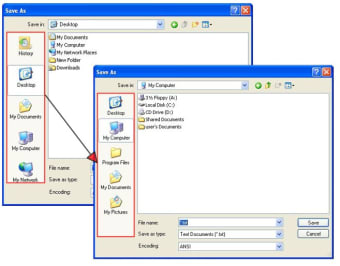
Add your favorite folders to the open/save dialog

While you may have dozens of folders in your hard drive, the ones that you really use on a daily basis are probably very few. Now, imagine being able to access these folders directly, instead of having to browse the whole file system every time you want to open or save a file in each of them... wouldn't it be nice?

Top Recommended Alternative

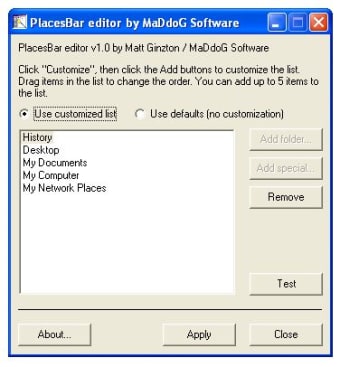
This is precisely what you can do with PlacesBar Editor. This simple tool enables you to edit the folder list that appears on every Open/Save dialog in Windows, so that it features your most frequently used folders and not simply some standard system folders that you hardly ever use.

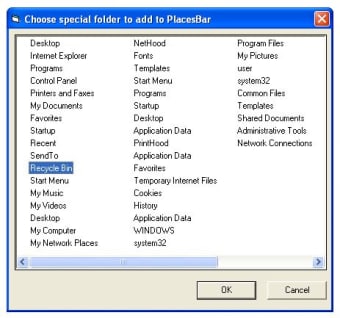
The program uses quite a dull interface, especially in comparison with other similar tools like PlacesBar Tweaker, but it works perfectly well. It enables you to add special folders (Control Panel, Program files, Cookies, Application Data and so on) or just about any folder you choose. You can even preview the results before actually applying them. And whenever you feel like going back to the standard folder list, simply select "Use defaults".

PlacesBar Editor boosts your productivity by making file management much faster and easier.

  • Pros

    • You can select any folder and also use system folders
    • Ability to test changes before applying them
  • Cons

    • Dull interface
 0/3

App specs

  • Developer

  • License

    Free

  • Version

    1.0.2

  • Latest update

  • Platform

    Windows

  • OS

    Windows XP

  • Language

    English

  • Downloads

    732

  • Size

    534.43 KB

Program available in other languages


Icon of program: PlacesBar Editor

PlacesBar Editor for PC

  • Free
  • 4.2
  • 732
  • V1.0.2
Free Download for PC

View an ad to download for free


User reviews about PlacesBar Editor

Have you tried PlacesBar Editor? Be the first to leave your opinion!

Add review

You may also like

Explore Apps

Latest articles

Laws concerning the use of this software vary from country to country. We do not encourage or condone the use of this program if it is in violation of these laws.
Softonic

Is PlacesBar Editor safe?

98/100

Score result: Clean

This file passed a comprehensive security scan using VirusTotal technology. It is safe to download.

  • Virus free
  • Spyware free
  • Malware free
  • Verified by Security Partners

    VirusTotal logo

Scan Info

Last scan
Monday, December 25, 2023
Scan provider
VirusTotal · Full report

File Integrity

File
PlacesBarEditor_Complete.zip
SHA256
44cbcbb0d55798ee8d4bed7813ade1cfae39e8f124c2529a6148fe4a1f1e07e2
SHA1
80e098fd4ef040eadc628f9e82cf6ddc393badf4

Softonic security commitment

PlacesBar Editor has been thoroughly scanned by our advanced security systems and verified by industry-leading partners. This file comes from the official developer and has passed all our security checks, showing no signs of viruses, malware, or spyware. For more information, visit our Security and Trust Center

Signed in to Softonic as